Microsoft · Dynamics 365 Business Central
Smart Change Control
for Business Central.
Data Gatekeeper goes beyond standard change logging — automatically restricting records, enforcing approval workflows, and delivering a clean, compliance-ready audit trail built entirely within Business Central.
100% Native — No External Connectivity
|
Microsoft AppSource Certified
|
Compliance-Ready Audit Trail
The Problem
The Native Change Log Captures Everything.
The Native Change Log Captures Everything.
That's the Problem.
Business Central Native Change Log
- Every insert, modification, and deletion stored as a new record
- The Change Log table grows rapidly
- Performance issues at scale
- Changes are hard to identify, find, and filter
- Every change recorded — even when reverting to the original value
- Too much information to process and review
Data Gatekeeper
- Captures only meaningful, intentional changes
- Commit-based logging addresses excessive log growth and performance issues
- Snapshot logging with key business events
- Clean, filterable audit trail — auto-filtered to the record you're on
- Automatically clears entries when values are restored
- Approval-ready from the moment a change is detected
How It Works
Three Layers of Intelligent Change Control
01
Capture Only What Matters
Built on Business Central's native change log engine, Data Gatekeeper eliminates noise before it reaches your audit trail. Blank text fields, zero-value numeric fields, and empty date fields can be excluded from the log until after the initial values are approved and committed. Changes can even be suppressed until a meaningful event occurs — like only logging sales line changes once the quantity field has been set.
02
Capture State, Not Just Changes
Instead of monitoring every incremental field change, snapshot logging captures the state of critical fields at the exact moment a significant event occurs — like a sales order moving to Released status. Less noise, more meaning.
03
Log It, Lock It, Enforce It
When a change is detected, Data Gatekeeper acts. Records are automatically restricted and approval workflows engage without manual intervention. Beyond the native workflow, Data Gatekeeper blocks printing and emailing of related reports until the restriction is lifted.
Features
Everything You Need to Control Your Data
Parent · Child Linking
Restrictions That Flow Both Ways
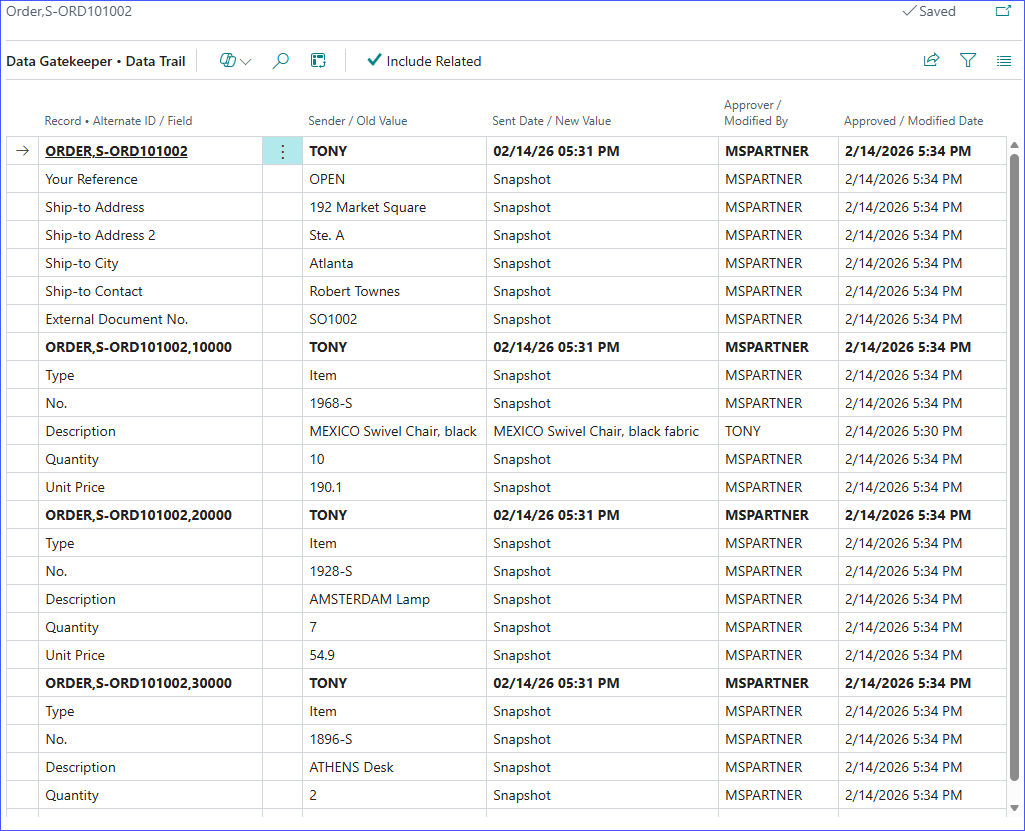
Link changes between parent and child records so that restrictions apply to both. View Sales Order line change logs directly from the Sales Order — no filter fiddling required. Open the Data Trail from the FactBox and it automatically filters to the record you're on.
Approval Notification Emails
Include change details directly in approval notification emails — reviewers see exactly what changed without opening the record.
Conditional Field Monitoring
Watch specific fields for conditional changes. Respond automatically — fire an event, display a message, or block the change entirely.
Workflow Wizard
Build approval workflows in minutes for virtually any logged table. No developer required — supports practically every table in Business Central.
Additional Benefits
Everything You Need. Nothing You Don't.
FactBox Visibility
See what's changed and what's pending approval at a glance, right in the card for the record.
One-Click Undo
Selectively reverse changes without leaving the record.
Flexible Log Retention
Set different retention periods per table to match your data governance policy.
Conditional Monitoring
Watch for specific field changes and respond automatically: fire an event, display a message, or block the change entirely.
Segregation of Duties
Prevent approvers from approving their own changes — built-in accountability.
Workflows For All
Build workflows in minutes for virtually any table that's logged. No code customization required.
Ready to Take Control of Your Data?
Data Gatekeeper is available now on Microsoft AppSource.
Runs natively in Microsoft Business Central · Trusted by Microsoft AppSource Customers · No external connectivity required
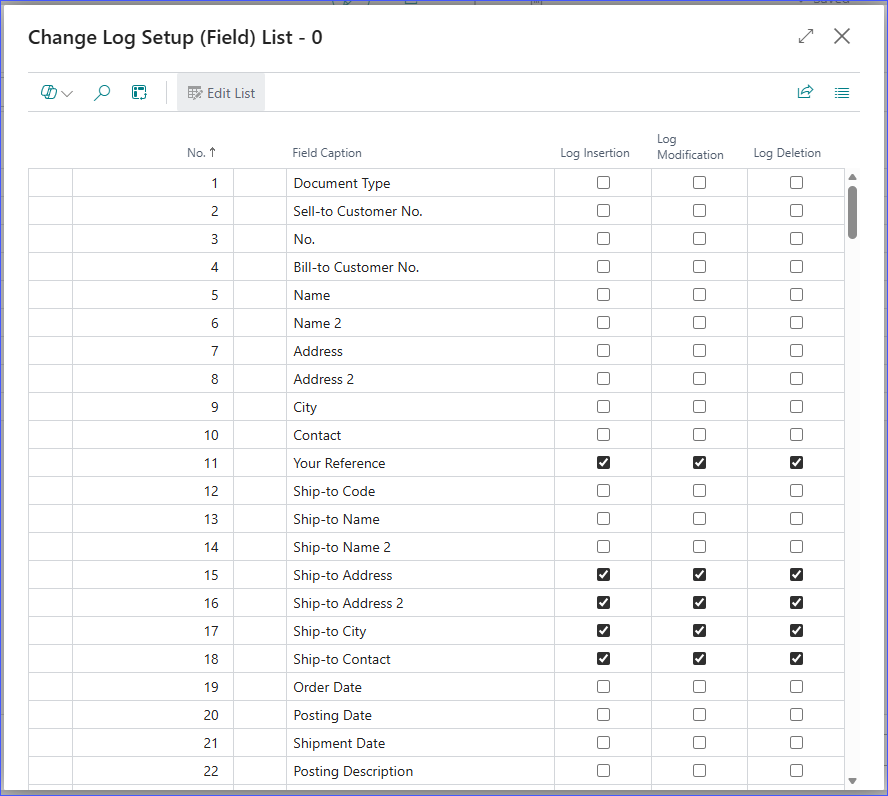
Change Log Setup - Sales Header
Sample setup for demonstration only, not necessary for Data Gatekeeper to operate.
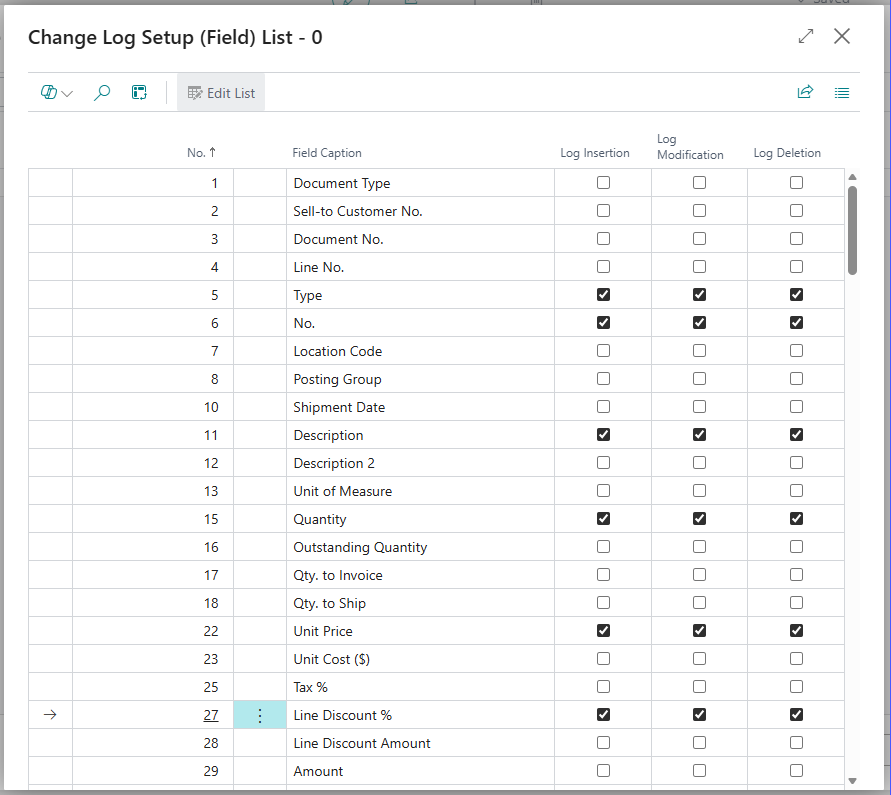
Change Log Setup - Sales Line
Sample setup for demonstration only, not necessary for Data Gatekeeper to operate.
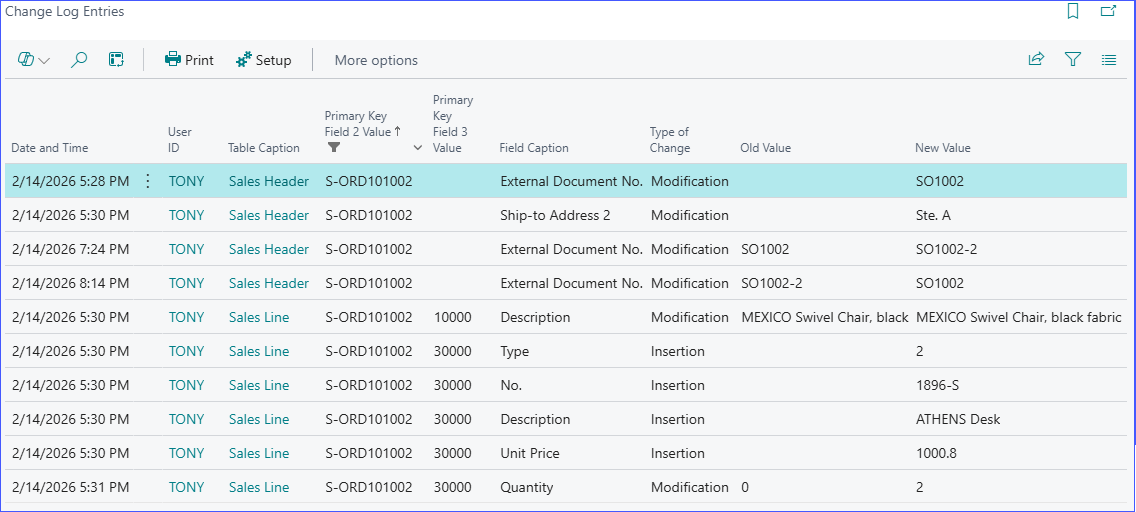
Change Log Entries
Changes are not easy to identify, hard to find, and hard to filter. Every change is recorded even when reverting changes. As a result, too much information
to process and review.
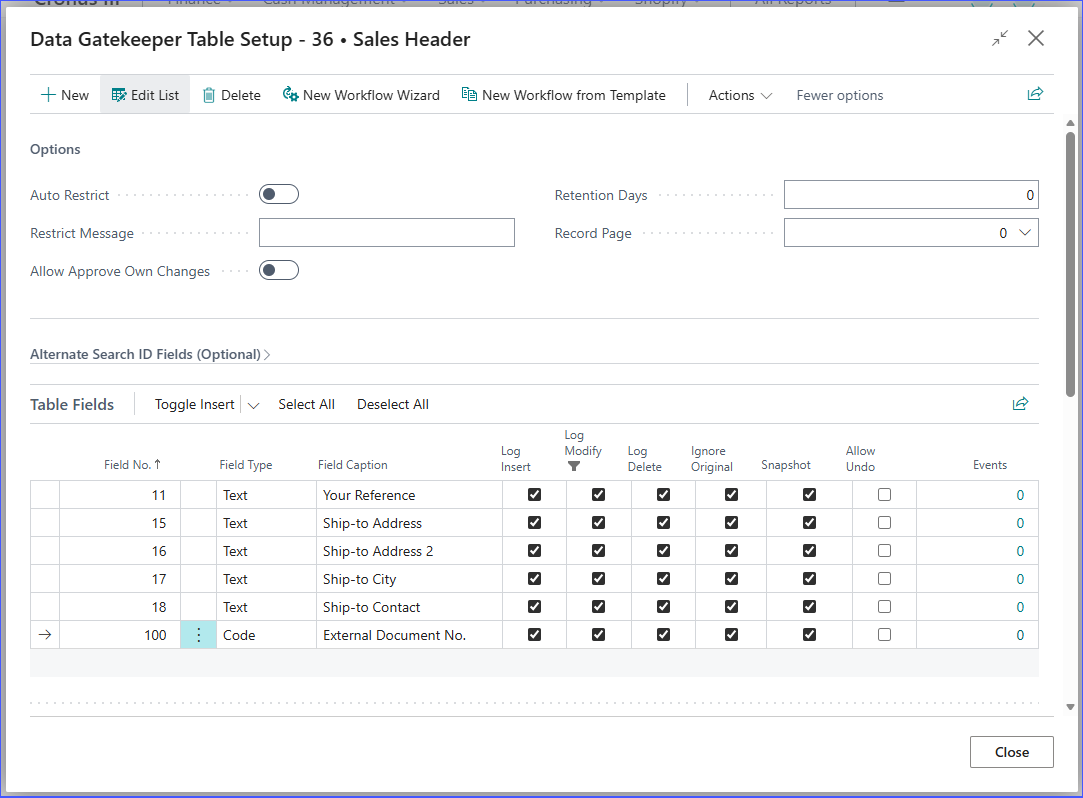
Data Gatekeeper - Sales Header
Sample setup for the Sales Header table.
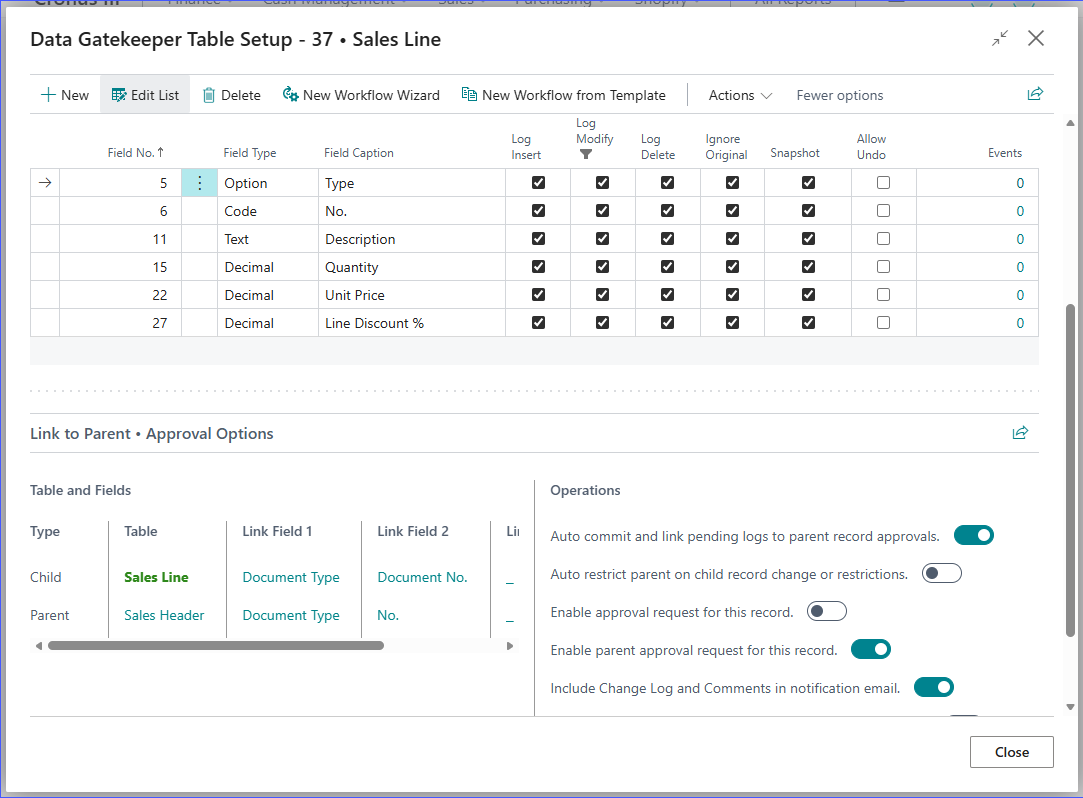
Data Gatekeeper - Sales Line
Sample setup for the Sales Header table. Note the special Link to Parent feature. This feature enables us to view the related child records when viewing
the parent record such as Sales Order lines when viewing change logs for the Sales Order.
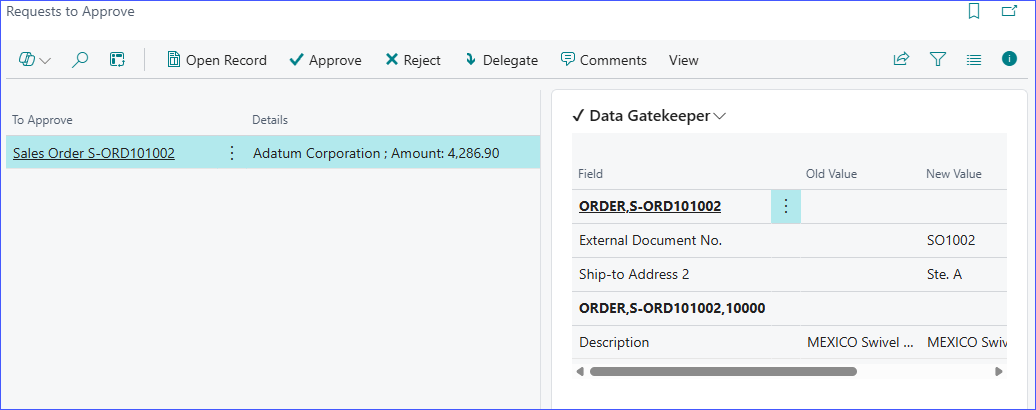
Requests to Approve
View change logs right within the Request to Approve page.
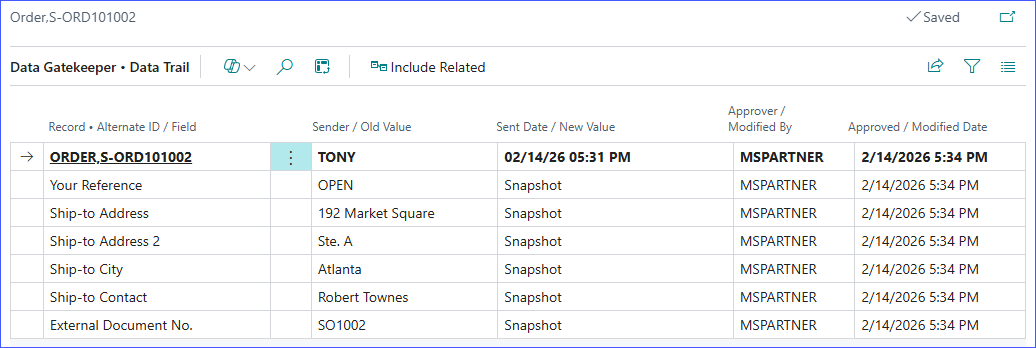
Data Trail - Sales Order
No more fiddling with filters to find change logs related to the record. Open the Data Trail from the Factbox control and it will automatically filter to
the record you're on.
Data Trail - Sales Lines
With the proper setup, you can include child related change logs when viewing the parent record.
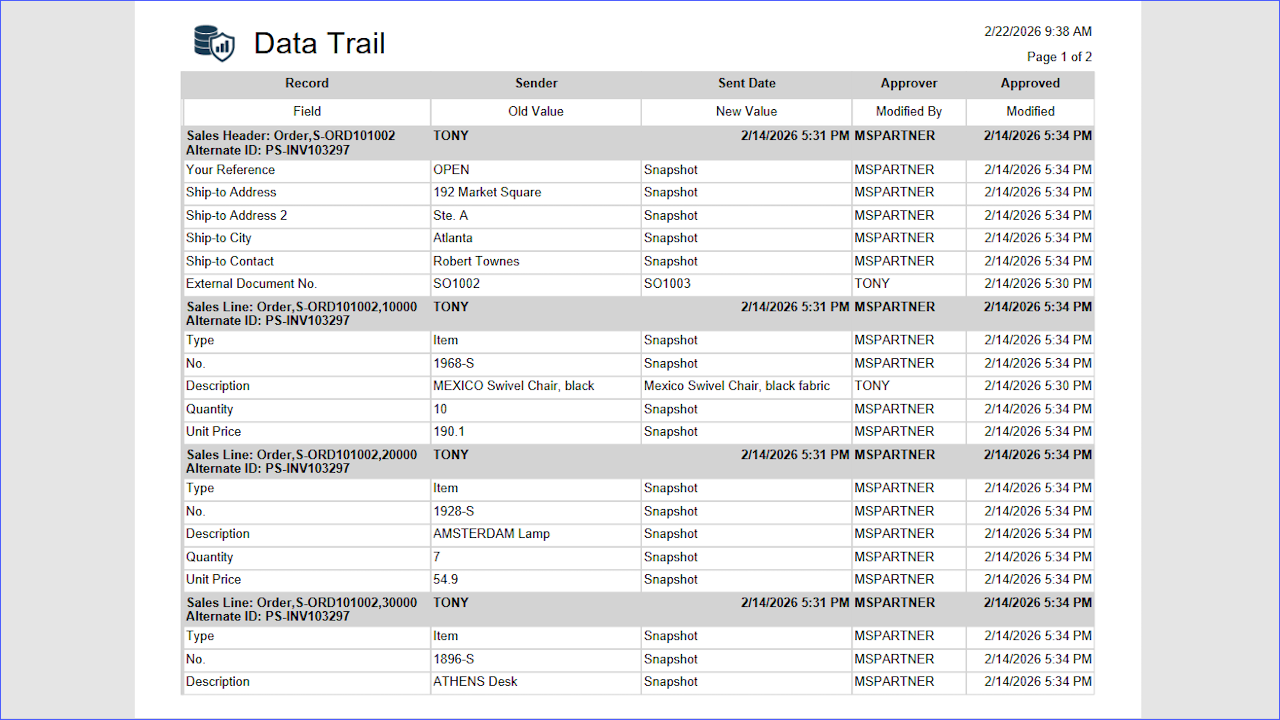
Data Trail Report